Colorize a black and white photo online
Updated 2026-11-01 · For hobbyists, genealogists, and anyone with old prints.
AI photo colorization predicts historically plausible colors from a grayscale scan. Results are interpretations — keep the original B&W master.
1. Prepare the scan
- Even light; export JPEG or PNG.
- Aim for the longest side ≥ 1200 px when you can.
- Do not oversharpen before colorizing.
2. Choose pricing that fits
Subscription genealogy tools can work, but if you only need colorization, a credit pack is simpler. Colorize Old: $12 = 50 credits ≈ $0.24/photo. No account required to buy.
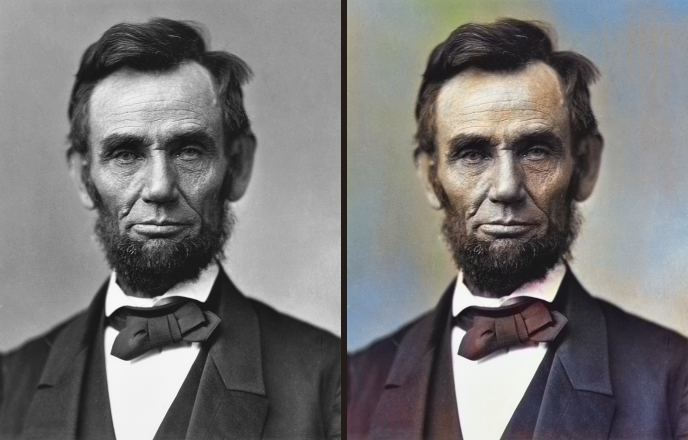
3. Check real before/after samples
Homepage samples use public-domain historical photos (faces + scenes), not abstract placeholders.
See Lincoln · Migrant Mother · Dust Bowl →
4. Pay, then email one photo
After Stripe payment, email one B&W JPEG/PNG to [email protected] with subject Colorize order. Reply includes your colorized JPEG. Repeat for remaining credits.
5. Share carefully
- Tell relatives it is AI-assisted color.
- Keep the B&W master beside the color JPEG.
Also read: How to colorize old family photos